Arizona Water chatbot
Designed to empower 7.58 million Arizonans with trusted water insights, enabling smarter choices that can conserve billions of gallons annually.
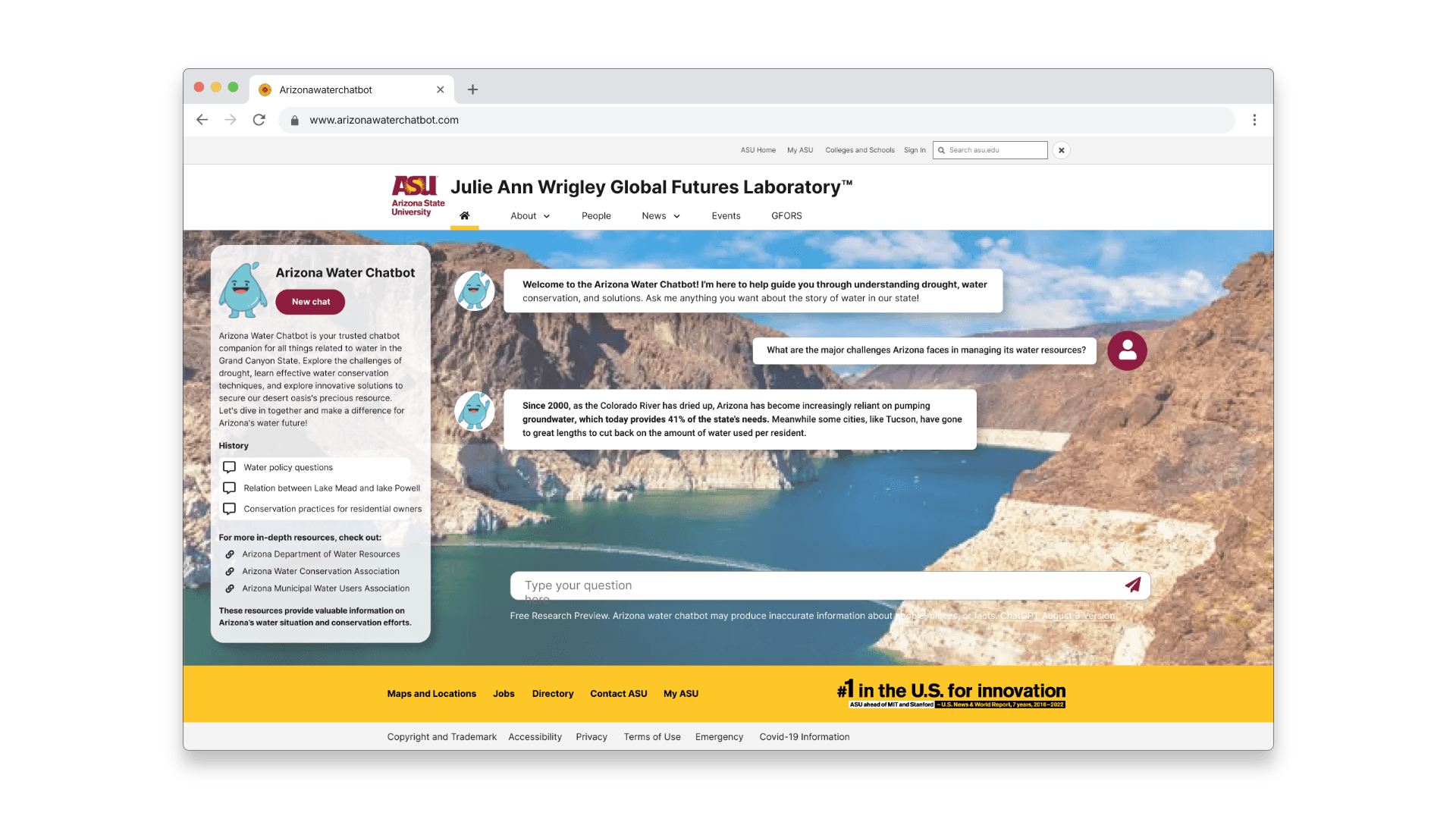
My Role
My Role
Product Designer — Research, Conversation Design, Interaction Design, Systems Design, Visual Design, Prototyping, User Testing.
Product Designer — Research, Conversation Design, Interaction Design, Systems Design, Visual Design, Prototyping, User Testing.
Overview
Overview
Designed to help Arizonans quickly access clear water information, I partnered with ASU Futures Lab to turn a dense website into an accessible, conversational chatbot for fast, actionable guidance on water levels, conservation, and reporting.
Designed to help Arizonans quickly access clear water information, I partnered with ASU Futures Lab to turn a dense website into an accessible, conversational chatbot for fast, actionable guidance on water levels, conservation, and reporting.
Team
Team
Product Manager | Research Scientists | Lead Designers | Content Designer | UX Researcher | Engineering Team.
Product Manager | Research Scientists | Lead Designers | Content Designer | UX Researcher | Engineering Team.
Timeline
Timeline
16 weeks
launched in Feb 2024
16 weeks
launched in Feb 2024
HIGHLIGHTS
“A chatbot for Arizona residents that provides key information and enables informed decisions to manage water use and report issues quickly.”
“A chatbot for Arizona residents that provides key information and enables informed decisions to manage water use and report issues quickly.”


CONTEXT
Arizona faces 25% of scarcity of water in Arizona which is from colorado
Arizona faces 25% of scarcity of water in Arizona which is from colorado
Arizona faces growing water stress from drought, climate change, and population growth; meanwhile many residents can’t easily locate clear, timely water guidance on official sites. The chatbot was built to simplify access to water levels, conservation tips, alerts, and reporting tools so people can act when it matters
Arizona faces growing water stress from drought, climate change, and population growth; meanwhile many residents can’t easily locate clear, timely water guidance on official sites. The chatbot was built to simplify access to water levels, conservation tips, alerts, and reporting tools so people can act when it matters
USER RESEARCH
Understanding the problem and the users
Understanding the problem and the users
To learn how residents actually searched, phrased questions, and interpreted answers, I ran a mixed-method study with 10 Arizona residents. We asked questions such as
“Can you walk me through the last time you looked for water-related information online?”
“What were you trying to understand, and how did you decide where to start?”
“When you used the current chatbot, what did you expect it to help you with?”
To learn how residents actually searched, phrased questions, and interpreted answers, I ran a mixed-method study with 10 Arizona residents. We asked questions such as
“Can you walk me through the last time you looked for water-related information online?”
“What were you trying to understand, and how did you decide where to start?”
“When you used the current chatbot, what did you expect it to help you with?”
Key Findings of the UX Audit
Key Findings of the UX Audit
Key Findings of the UX Audit
Long responses and Technical jargons
Answers were dense, jargon-heavy, and difficult to scan, causing users to lose track of key information.
Lack of query guidence
Users didn’t know what to ask or how to phrase their questions. No suggestion chips, examples, or prompts supported them.
Missing chat history and text retention
Users couldn’t revisit important answers, making multi-step tasks difficult and forcing them to restart conversations
Slower response time
The system felt unresponsive, causing frustration and early drop-off during tasks.
SYNTHESIS
Understanding the problem and the users
Understanding the problem and the users
Understanding the problem and the users
After completing interviews and the UX audit, I ran an affinity mapping session to cluster raw observations into patterns.
23 individual observations across 10 residents collapsed into 4 recurring themes — each one pointing to the same root problem: the chatbot was built for information delivery, not human decision-making.
After completing interviews and the UX audit, I ran an affinity mapping session to cluster raw observations into patterns.
23 individual observations across 10 residents collapsed into 4 recurring themes — each one pointing to the same root problem: the chatbot was built for information delivery, not human decision-making.
COMPETITIVE RESEARCH
Working with 4 Large Language Models (LLMs)
Working with 4 Large Language Models (LLMs)
To refine how the chatbot interprets user questions, I compared responses across 4 leading LLMs, analyzing how each model handled ambiguous, complex, and low-context prompts that helped me understand differences in reasoning, tone, and clarity.
To refine how the chatbot interprets user questions, I compared responses across 4 leading LLMs, analyzing how each model handled ambiguous, complex, and low-context prompts that helped me understand differences in reasoning, tone, and clarity.

Better reasoning + conversational clarity
Better reasoning + conversational clarity

Safety Alignment + grounded facts
Safety Alignment + grounded facts

Conciseness + humanized answers
Conciseness + humanized answers
Task guided + action driven
Task guided + action driven
SETTING THE GOALS
"My aim was to design a chatbot experience that delivers clear, concise, and trustworthy water information fast enough for urgent moments and simple enough for any resident to understand."
Reduce response time
Reduce response time
User-friendly responses
User-friendly responses
User-friendly responses
User-friendly responses
Improved user interface
Improved user interface
PERSONA DEVELOPMENT
Who I was designing for?
Who I was designing for?
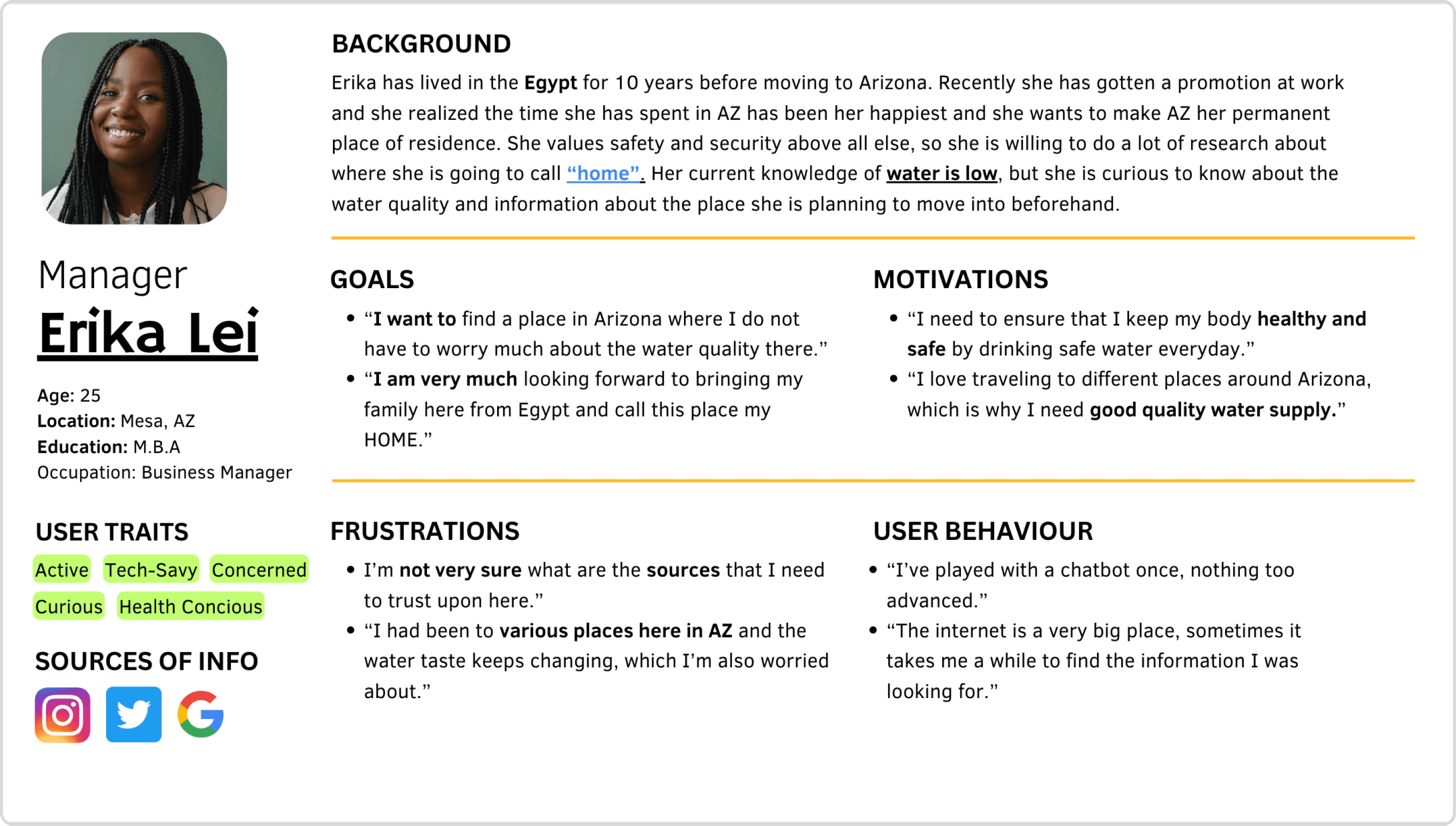
I began by understanding who relies on water information in Arizona and how they currently search for it. Through interviews and observations, I saw clear patterns among “Young Internationals” — proactive residents who value clarity, trust, and quick guidance when making decisions about water safety and daily use
I began by understanding who relies on water information in Arizona and how they currently search for it. Through interviews and observations, I saw clear patterns among “Young Internationals” — proactive residents who value clarity, trust, and quick guidance when making decisions about water safety and daily use
IDEATION
Mapping out key ideas
Mapping out key ideas
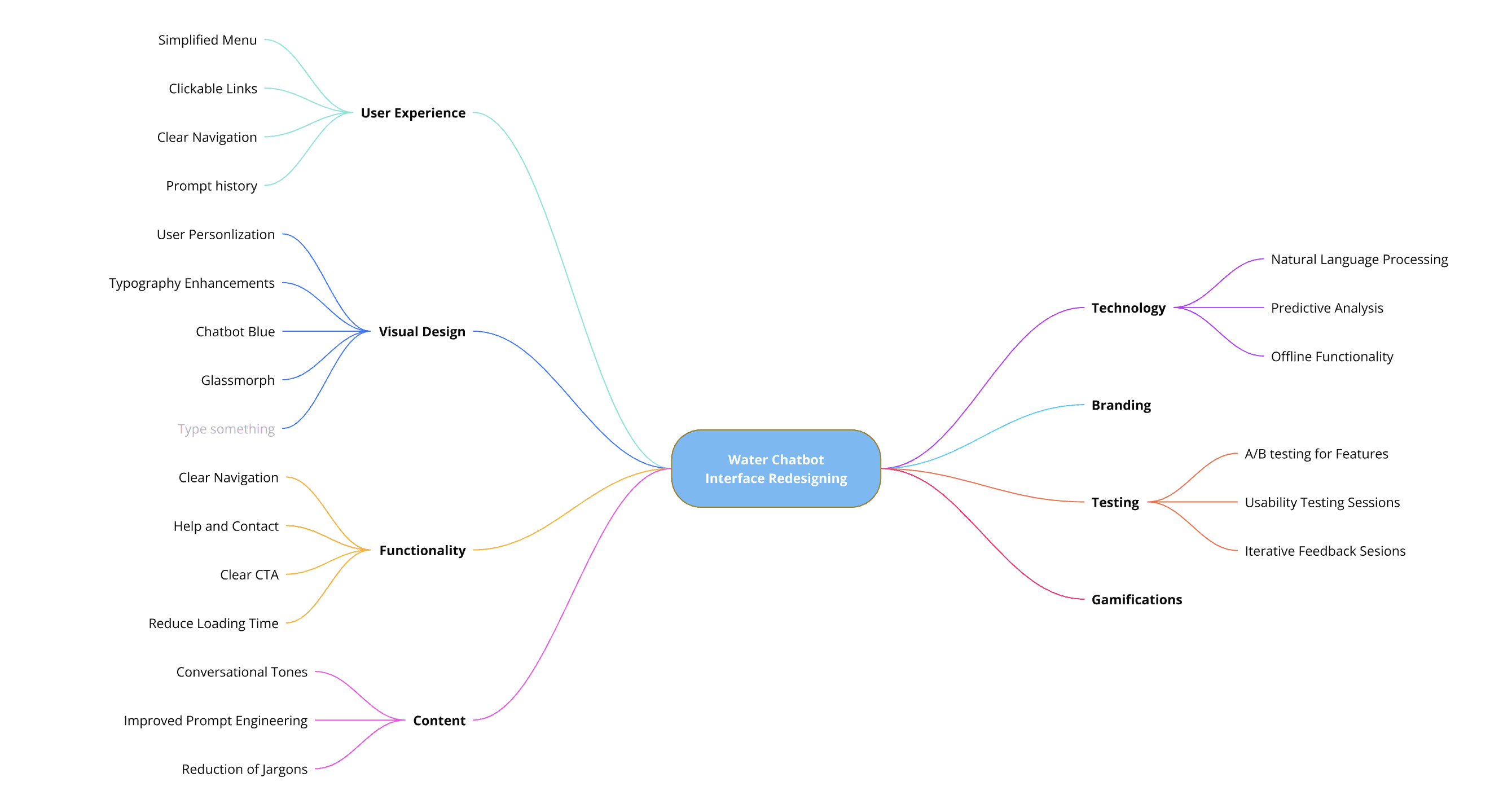
I mapped every user pain point to potential solutions, reimagining how residents interact with the chatbot. The goal was to design a system that feels simple, intuitive, and genuinely helpful in guiding users toward the right water information
I mapped every user pain point to potential solutions, reimagining how residents interact with the chatbot. The goal was to design a system that feels simple, intuitive, and genuinely helpful in guiding users toward the right water information
UI DESIGN
Identifying KPIs and solutions
Identifying KPIs and solutions
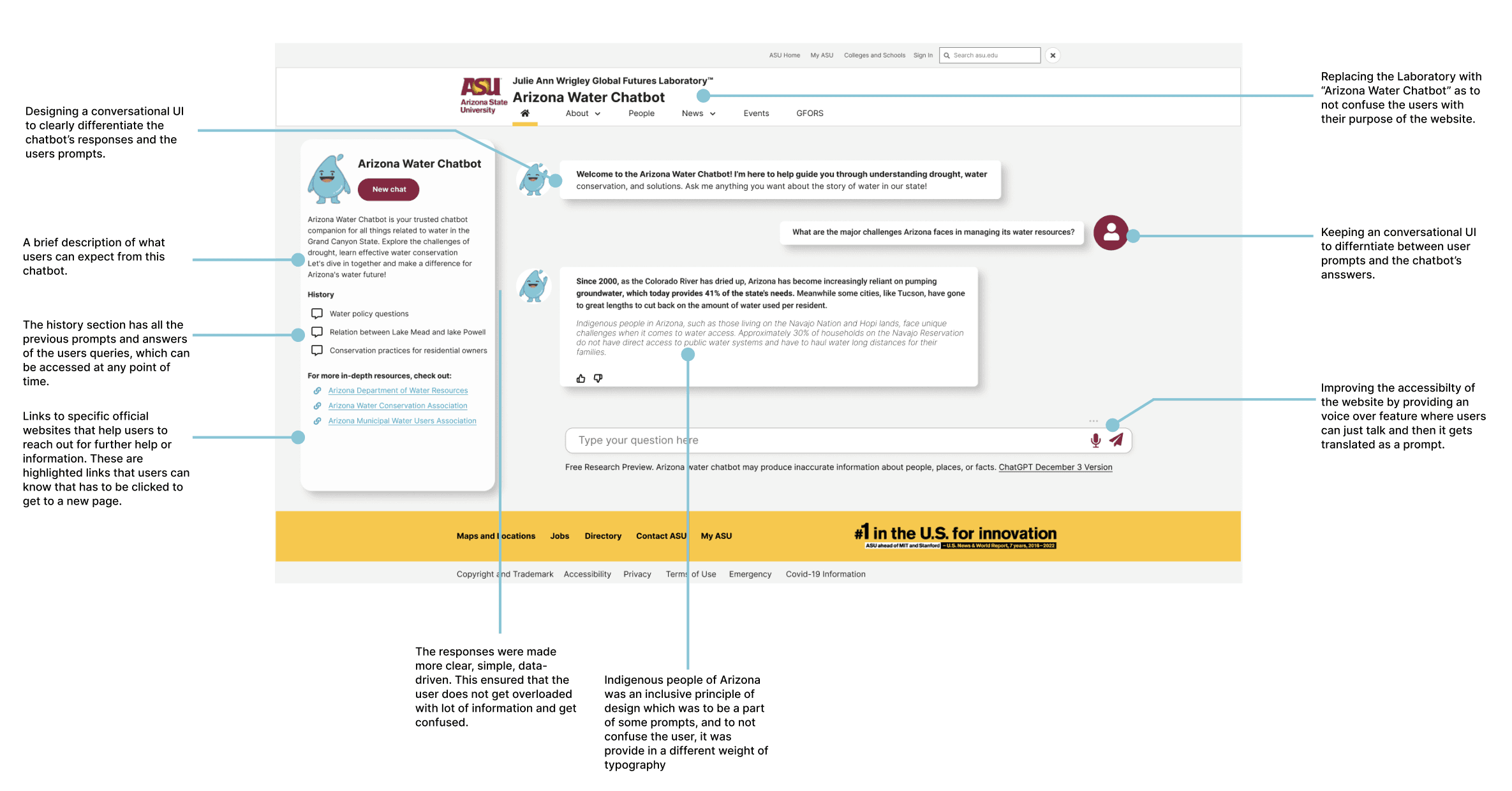
Insights from user research directly shaped the next phase of design. Each finding was translated into clear, measurable improvements, decluttering the interface, introducing conversational and customizable elements, and refining the visual language. These updates worked together to create a smoother, more human experience that feels effortless to use and easy to trust.
Insights from user research directly shaped the next phase of design. Each finding was translated into clear, measurable improvements, decluttering the interface, introducing conversational and customizable elements, and refining the visual language. These updates worked together to create a smoother, more human experience that feels effortless to use and easy to trust.
Redesigning the user experience
Redesigning the user experience
With all our research and analysis in place, we translated these insights directly into a redesigned experience that improved clarity, guidance, and overall usability for residents.
With all our research and analysis in place, we translated these insights directly into a redesigned experience that improved clarity, guidance, and overall usability for residents.
WHAT AREAS I FOCUSED ON REDESIGNING
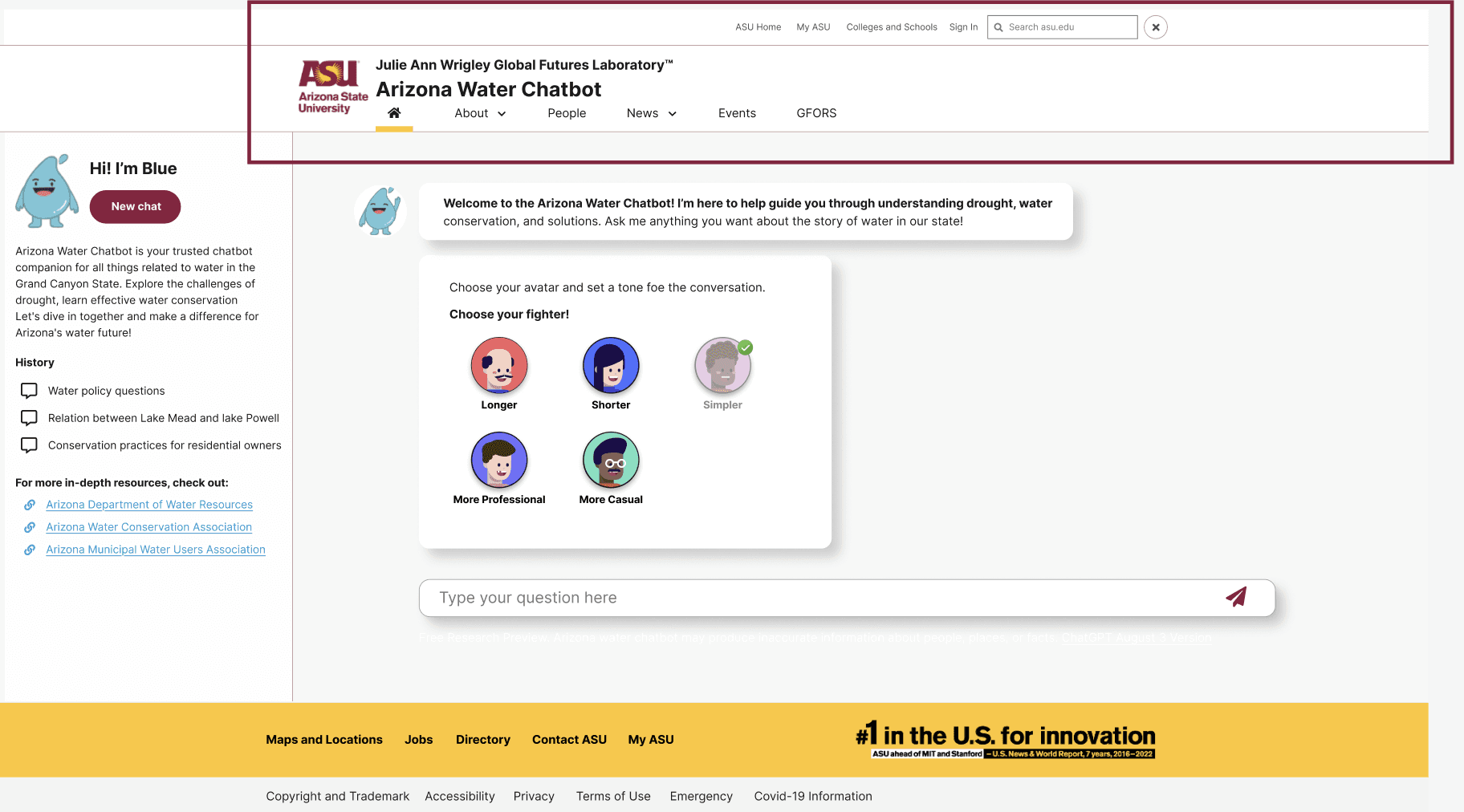
VISUAL MAPPING
A visually engaging background helps draw users in, making the interface more appealing and intuitive. It enhances focus, reduces cognitive load, and creates a more immersive experience, improving overall user engagement.
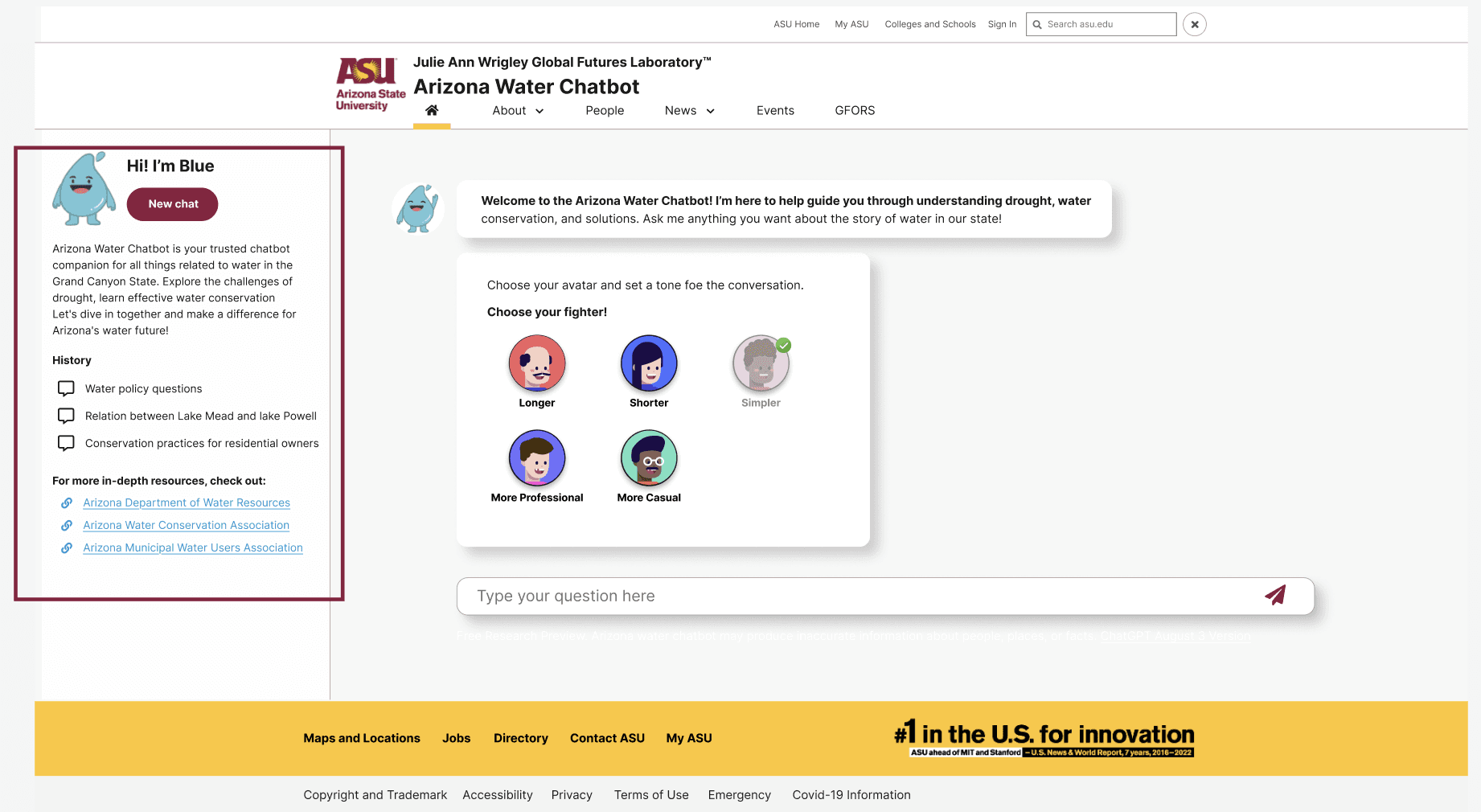
SEARCH AND HISTORY
Providing tone customization allows users to tailor responses to their communication style and needs. This enhances clarity, improves engagement, and ensures a more user-friendly, adaptable chatbot experience.
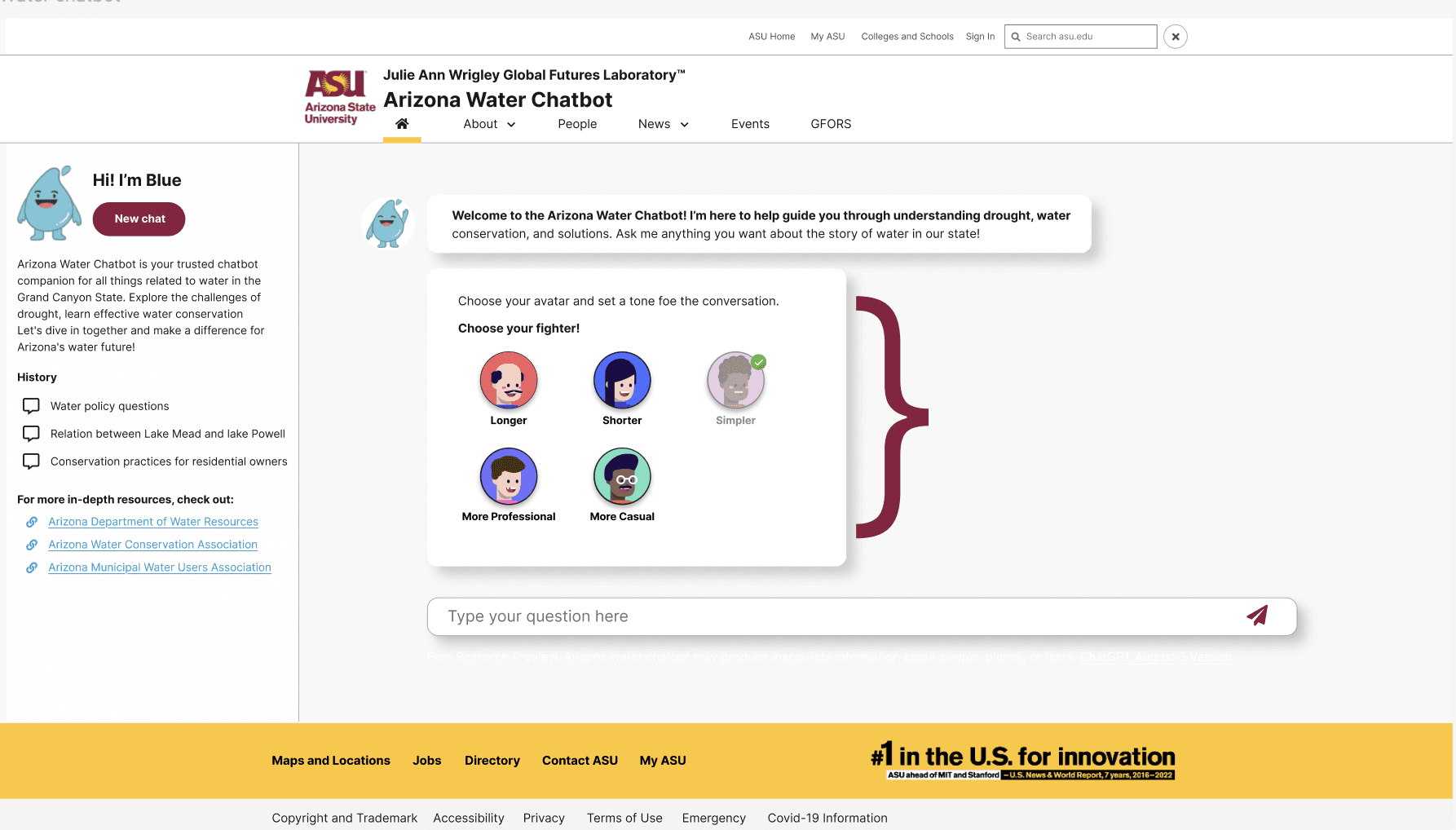
CONVERSATIONAL EXPERIENCE
Allowing users to personalize their background enhances engagement and comfort, creating a more user-centric experience. It gives users a sense of control and familiarity, making interactions feel more natural and enjoyable
TESTING AND FEEDBACK
Testing the chatbot with the end users
Testing the chatbot with the end users
To validate the redesign, we conducted usability testing with four Arizona residents representing diverse ages, tech comfort levels, and water knowledge. Each participant completed task-based scenarios, followed by post-test questionnaires to capture feedback and emotional responses.
To validate the redesign, we conducted usability testing with four Arizona residents representing diverse ages, tech comfort levels, and water knowledge. Each participant completed task-based scenarios, followed by post-test questionnaires to capture feedback and emotional responses.
Task Based Scenarios
Participants were asked to complete specific tasks within the chatbot.
Participants were asked to complete specific tasks within the chatbot.
THINK ALOUD PROTOCOL
We asked participants to "think aloud" as they interacted with the chatbot, verbalizing their thoughts, frustrations, and successes.
POST-TEST QUESTIONNAIRE
After testing, participants completed questionnaires to gather quantitative data on ease of use, satisfaction, and perceived usefulness.
Users said…
Users said…
"This version feels more easier and clearer to understand & use… I'd rate it a 4.9/5!"
The stakeholders say…
The stakeholders say…